Reproducibility Workshop

2 September, 2026
Agenda
- What is expected from you as an author nowadays?
- 10 simple rules to Reproducibility compiled by the Econ Data Editors.
- The
READMEfile. - Some Reproducibility Best Practices.
- AI and Reproducibility?
- Let’s start a reproducible research project!
Your Contribution
- Large value added of this event comes from your questions.
- Let’s discuss all of this!
What Is Required From Authors? 🫵
What is Required from Authors?
- Most (all?) journals require authors to share code and data.
- Only 19 (!) journals endorse the Data and Code Availability Standard and enforce it via a Data Editor.
What Do We Expect
An advanced graduate student should be able to generate
- All Figures
- All Tables
- All in-text numbers
with your package in the most user-friendly way possible.
A priori, our output should be exactly equal to yours. 😬
10 simple rules to Reproducibility
- Computational Empathy
- Make data accessible
- Cite Data and how to access it
- Describe software and hardware requirements
- Provide all code
- Explain how to reproduce your work
- Provide a table of all things that can be reproduced
- Include all supporting material
- Use a permissible license. Any license is better than none.
- Re-run everything!
The README File
- Plain text top level file which explains everything about your package.
- We have a useful template and a template generator.
- Here are the minimum requirements for a
READMEat JPE
Best Practices
Best Practices
- Project Organisation (folder structure)
- Code
- Data
- Output
Best Practices
Project Organisation
- Folder Structure is a first order concern for your project.
Minimum Requirement
There should be a separation along:
- Inputs: Data, parameters, etc
- Outputs: Numbers, tables, figures
- Code
- Paper/Report etc
Example?
Best Practices
Good or Bad?
.
├── 20211107ext_2v1.do
├── 20220120ext_2v1.do
├── 20221101wave1.dta
├── james
│   └── NLSY97
│       └── nlsy97_v2.do
├── mary
│   └── NLSY97
│       └── nlsy97.do
├── matlab_fortran
│   ├── graphs
│   ├── sensitivity1
│   │   ├── data.xlsx
│   │   ├── good_version.do
│   │   └── script.m
│   └── sensitivity2
│       ├── models.f90
│       ├── models.mod
│       └── nrtype.f90
├── readme.do
├── scatter1.eps
├── scatter1_1.eps
├── scatter1_2.eps
├── ts.eps
├── wave1.dta
└── wave2.dta
└── wave2regs.dta
└── wave2regs2.dta
(scroll down! 😉)
Bad! 👎
- Sub directories are not helpful
- File names are confusing
- code/data/output are not separated
Best Practices
Good 👍
.
├── README.md
├── code
│   ├── R
│   │   ├── 0-install.R
│   │   ├── 1-main.R
│   │   ├── 2-figure2.R
│   │   └── 3-table2.R
│   ├── stata
│   │   ├── 1-main.do
│   │   ├── 2-read_raw.do
│   │   ├── 3-figure1.do
│   │   ├── 4-figure3.do
│   │   └── 5-table1.do
│   └── tex
│       ├── appendix.tex
│       └── main.tex
├── data
│   ├── processed
│   └── raw
└── output
    ├── plots
    └── tables
Good.
- Meaningful sub directories
- top level
README - code/data/output are separated
Best Practices
Example: TIER Protocol structure
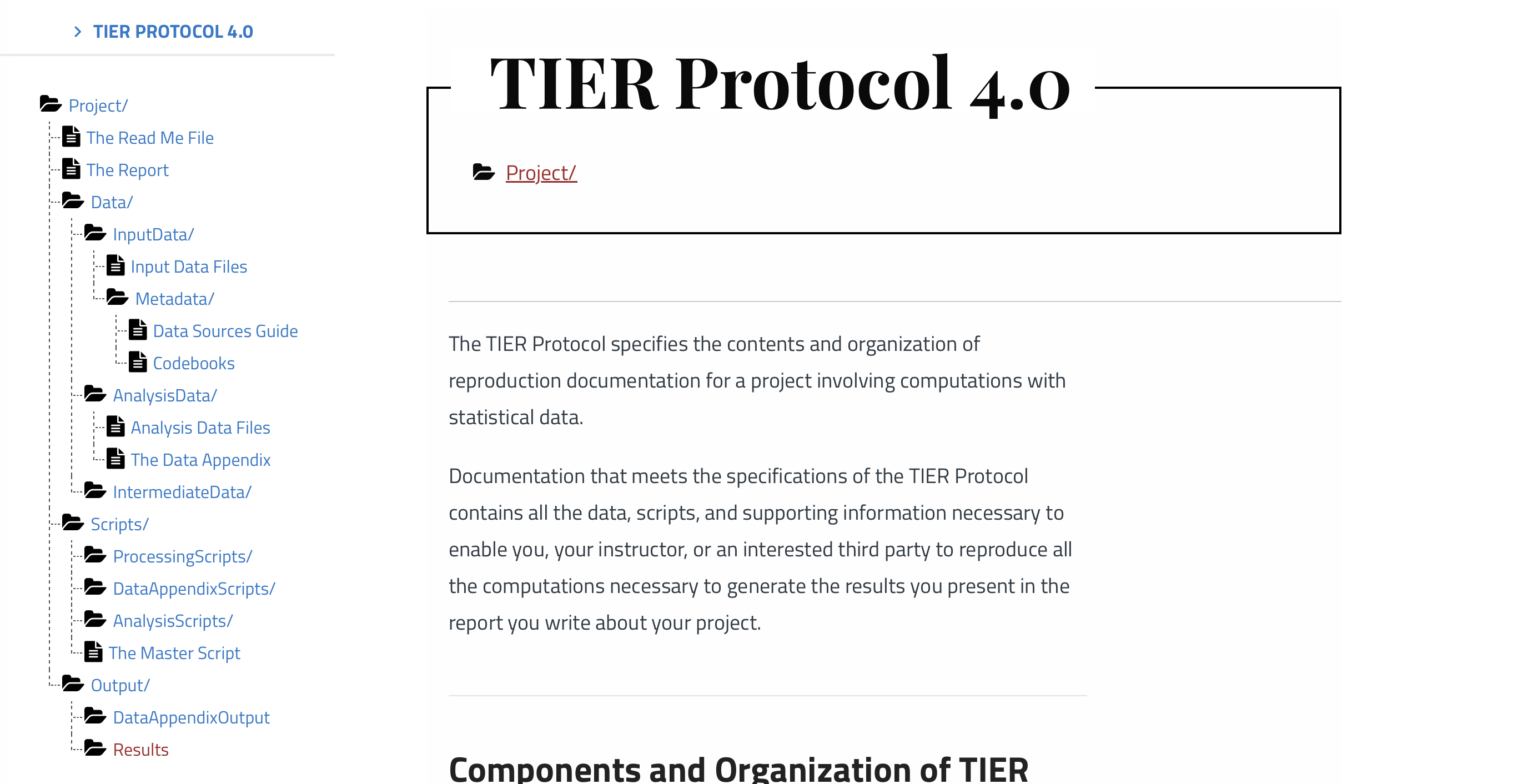
Best Practices
Best Project Structure?
No Size Fits All
There is no unique best way to organize your project: Make it simple, intuitive and helpful.
Important
Ideally your entire project is under version control.
Reproducible Code
Reproducible Code
Question:
How to write reproducible code?
👉 Huge question to answer. Let’s try with a few simple things first:
- Provide a run script which…runs everything. Run it often!
- No copy and paste in your pipeline! Write results to computer’s storage.
- Clear instructions
- Provide a clear way to create the required environment (library installation etc)
Reproducible Code
No Manual Manipulation.
- Change this parameter to 0.4, then run code again 😖
- I computed this number manually 😖😖
Do This!
- Use functions, ado files, programs, macros, subroutines etc
- Use loops and parameters
- Use placeholders for file paths
In general, take all necessary steps to ensure cross-platform compatibility of your code.
file paths are such low-hanging fruit 🍇…
don’t build tables by hand
Reproducible Code
File Paths
👉 Ask the user to set the root of your project, via global variable, environment variable, or other
Always use forward slashes on Stata /, even on a windows machine!
Reproducible Code
Tables
Reproducible Code
Safe Environments for Running Your Code
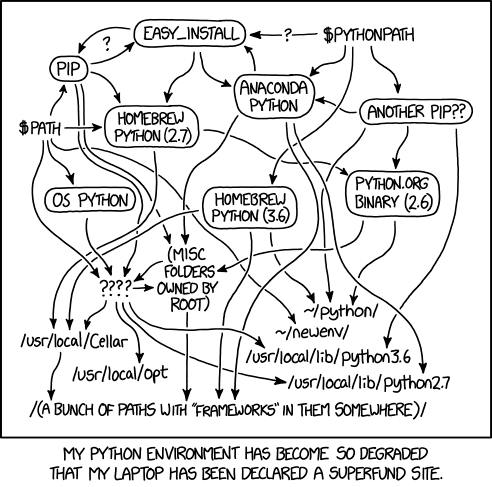
No Guarantee
Your code will yield identical results on a different computer only if certain conditions apply.
Protected Environments
👉 You should provide a mechanism which ensures that those conditions do apply.
Reproducible Code 💻
Is Our Daily Bread 🍞
🧪 Reproducibility: Bread Baking vs. Code Execution
| 🍞 Baking Bread (Chemical Experiment) | 💻 Running a Script (Computational Experiment) |
|---|---|
| Ingredients | Dependencies |
| - 500g flour | - Python 3.10 |
| - 300ml water | - numpy==1.24.0 |
| - 7g dry yeast | - pandas==1.5.3 |
| - 10g salt | - scikit-learn (no version specified) |
🧪 Reproducibility: Bread Baking vs. Code Execution
| 🍞 Baking Bread (Chemical Experiment) | 💻 Running a Script (Computational Experiment) |
|---|---|
| Ingredients | Dependencies |
| - 500g flour | - Python 3.10 |
| - 300ml water | - numpy==1.24.0 |
| - 7g dry yeast | - pandas==1.5.3 |
| - 10g salt | - scikit-learn (no version specified) |
| Instructions | Instructions |
| 1. Mix ingredients | 1. Clone the repository from GitHub |
| 2. Knead dough | 2. Create and activate a virtual environment |
| 3. Let rise 1 hour at room temperature | 3. Install dependencies from requirements.txt |
| 4. Bake at 220°C for 30 minutes | 4. Run python train_model.py with default config |
🧪 Reproducibility: Bread Baking vs. Code Execution
| 🍞 Baking Bread (Chemical Experiment) | 💻 Running a Script (Computational Experiment) |
|---|---|
| Ingredients | Dependencies |
| - 500g flour | - Python 3.10 |
| - 300ml water | - numpy==1.24.0 |
| - 7g dry yeast | - pandas==1.5.3 |
| - 10g salt | - scikit-learn (no version specified) |
| Instructions | Instructions |
| 1. Mix ingredients | 1. Clone the repository from GitHub |
| 2. Knead dough | 2. Create and activate a virtual environment |
| 3. Let rise 1 hour at room temperature | 3. Install dependencies from requirements.txt |
| 4. Bake at 220°C for 30 minutes | 4. Run python train_model.py with default config |
| Expected Outcome | Expected Outcome |
| - Well-risen, airy loaf of bread | - Consistent training accuracy and saved model |
⚠️ What Could Possibly Go Wrong?
| 🍞 Bread Baking (Chemical Experiment) | 💻 Running a Script (Computational Experiment) |
|---|---|
| 1. Yeast Inactivation | 1. Library Version Mismatch |
| Water too hot (e.g., 60°C) kills the yeast. No rise. | scikit-learn was updated → train_test_split() behaves differently, causing changes in results. |
⚠️ What Could Possibly Go Wrong?
| 🍞 Bread Baking (Chemical Experiment) | 💻 Running a Script (Computational Experiment) |
|---|---|
| 1. Yeast Inactivation | 1. Library Version Mismatch |
| Water too hot (e.g., 60°C) kills the yeast. No rise. | scikit-learn was updated → train_test_split() behaves differently, causing changes in results. |
| 2. Cold Proofing | 2. Different OS / File System |
| Room too cold (e.g., 15°C) → dough rises too slowly. | Path handling fails on Windows vs. Linux (\ vs. /), or line endings cause script errors. |
⚠️ What Could Possibly Go Wrong?
| 🍞 Bread Baking (Chemical Experiment) | 💻 Running a Script (Computational Experiment) |
|---|---|
| 1. Yeast Inactivation | 1. Library Version Mismatch |
| Water too hot (e.g., 60°C) kills the yeast. No rise. | scikit-learn was updated → train_test_split() behaves differently, causing changes in results. |
| 2. Cold Proofing | 2. Different OS / File System |
| Room too cold (e.g., 15°C) → dough rises too slowly. | Path handling fails on Windows vs. Linux (\ vs. /), or line endings cause script errors. |
| 3. High Altitude Baking | 3. Hardware Differences (e.g., CPU vs. GPU) |
| Lower pressure expands gas too fast; loaf collapses. | Numerical precision differs → inconsistent model outputs. |
⚠️ What Could Possibly Go Wrong?
| 🍞 Bread Baking (Chemical Experiment) | 💻 Running a Script (Computational Experiment) |
|---|---|
| 1. Yeast Inactivation | 1. Library Version Mismatch |
| Water too hot (e.g., 60°C) kills the yeast. No rise. | scikit-learn was updated → train_test_split() behaves differently, causing changes in results. |
| 2. Cold Proofing | 2. Different OS / File System |
| Room too cold (e.g., 15°C) → dough rises too slowly. | Path handling fails on Windows vs. Linux (\ vs. /), or line endings cause script errors. |
| 3. High Altitude Baking | 3. Hardware Differences (e.g., CPU vs. GPU) |
| Lower pressure expands gas too fast; loaf collapses. | Numerical precision differs → inconsistent model outputs. |
| 4. Too Much Salt | 4. Missing or Incorrect Environment Variable |
| Excess salt suppresses yeast → poor fermentation. | DATA_DIR not set → script fails or loads wrong input silently. |
| Result: Flat, dense, or failed bread | Result: Different outputs, errors, or failed experiments |
Reproducible Code
Safe Environments for Running Your Code
At a minimum, your
READMElists the exact computing environment:OS, software and which version used (
R 4.1,stata 17/MP,matlab 2023b,GNU Fortran (Homebrew GCC 13.2.0))Libraries and which exact version used (
ggplot2 1.3.4,outreg 2,numpy 1.26.4,boost 1.8.3)Stata: install all libraries into your replication package.
👉 Virtual Environments can help.
Reproducible Code
Provide a Virtual Environment
Reproducible Code
Stata Virtual Environment
- Include a
version xyzstatement in master script. - User contributed libraries are not versioned.
- You must install all libraries next to your project code. If not,
ssc install somelibwill install an incompatible version a few years later. - Here is a _config.do script forcing stata to use only libraries installed in a given location.
- Excellent guidance by Julian Reif
- We will do this later on!
Reproducible code
- Such mechanisms can reduce version conflicts amongst your dependencies.
- To the extent that all versions of those dependencies are still available, this guarantees a stable computing environment.
Data
Data
- Always keep your raw data intact (i.e. read-only).
- Generate separate analysis datasets to perform analysis.
- Datasets change over time, keep a record of the date and versions you obtained. It might be difficult to obtain it in the future.
What about Confidential Data?
- If we have instructions for direct access, we try (time limit: 30 mins)
- If not, try to get access to authors/data provider’s machine (i.e. their screen)
- If not, data provider may certify results for us.
- If not, must provide simulated version of data.
Output
Output
- Write both tables and figures to local storage (don’t just display on the console!)
- The gold standard: include this table in your readme.
| Output in Paper | Output in Package | Program to execute |
|---|---|---|
| Table 1 | outputs/tables/table1.tex |
code/table1.do |
| Figure 1 | outputs/plots/figure1.pdf |
code/figure1.do |
| Figure 2 | outputs/plots/figure2.pdf |
code/figure2.do |
Output
- keep a full pipeline intact at all times:
run_all() - have a dedicated output folder which you delete frequently
- version output: during revisions, create separate locations for output,
rev1,rev2etc, so you know exactly what version of code made which output.
AI 🤖
AI and Reproducibility
- How do researchers use AI?
- Does AI create different reproducibility concerns?
- My paper on this: Randomness in Large Language Models
- Slides on that paper
How a Model Picks the Next Word
The model writes one token at a time. Each candidate for the next token gets a probability.
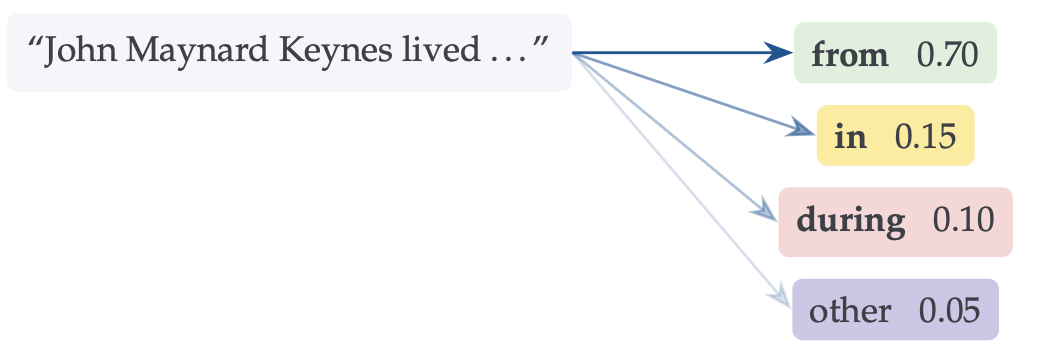
- A greedy rule always takes the top scoring token.
- Sampling draws instead, which makes text less repetitive.
- Later scores depend on the tokens already written.
Important
One different token early on can change the whole answer.
Four Sources of Non-Determinism
- Deliberate sampling. The next token is drawn from the score distribution, scaled by a temperature \(T\). Setting \(T=0\) goes greedy and costs nothing — but several 2026 reasoning models no longer expose the parameter.
- Silent model updates. The provider swaps the weights behind an unchanged public name. Accuracy on one prime number task fell from 84% to 51% within three months.
- Floating point rounding. Finite precision arithmetic is not associative, so the order of operations changes the answer. Server load, hardware and model splitting all change that order.
- Expert routing. In mixture-of-experts models, per-expert capacity is limited within a batch — so whether your token reaches its preferred expert depends on other users’ requests.
What Researchers Can Control
| What differs | In plain terms | Survives \(T=0\)? | Local | API |
|---|---|---|---|---|
| Deliberate randomness | ||||
| Sampling | Words are drawn at random from the score distribution. | no | full | some models |
| The model is not the same model | ||||
| Silent updates | The provider swaps the model behind an unchanged name. | yes | full | none |
| Same arithmetic, different order | ||||
| Server load | Other prompts arriving together change how work is divided. | yes | full | none |
| Hardware | A different chip or library divides the arithmetic differently. | yes | full | none |
| Model splitting | Partial results from several chips recombine in a varying order. | yes | partial | none |
| A different part of the model ran | ||||
| Expert routing | Other users take the places, so your prompt gets its second choice. | yes | partial | none |
Differences between two runs of an identical prompt. Local means open weights on the user’s own hardware, API means the provider’s infrastructure.
What Authors Need to Report
| Item | In the paper | In the package |
|---|---|---|
| What the model was | ||
| Name, exact version, provider, access route, query date | Must have | Must have (plus stack, if local) |
| Archived open weights, or their hash | — | Good to have |
| Training data cutoff, against the sample period | Must have (if known) | — |
| How it was run | ||
| Verbatim prompts, system messages, examples | Must have (in an appendix) | Must have |
| Generation parameters, defaults flagged as such | Must have (headline settings) | Must have (full configuration) |
| What it produced | ||
| All inputs and raw outputs, every run, before processing | — | Must have |
| Variability report: draws, agreement, sensitivity | Good to have | — |
| What it cost | ||
| Token counts, monetary cost, runtime | — | Must have |
Reporting items for model generated variables. Must have items are essentially free to provide.
Break ☕️ 🍰
Hands On Session 💪🏽
10 Steps till Reproducibility
Step 1: Project Setup and Data Acquisition
Create a folder structure:
data,code,output,paperCreate
README.mdat root of this structuredownload example data from zenodo
- save data citation
- copy data into
data/raw - set data to read only
Follow along at https://github.com/floswald/ReproWorkshop
Step 2: Stata Setup
- Create folder
code/stata - Create a
run.dofile - Set up a
config.doas well.
Here is an outline of a potential run.do file:
run.do
    - set global variables: paths, full/partial data etc
    - call config.do
        - tell stata where to look for add-ons
- run analysis- Stata does not crash upon error in nested do-file: must look at
logs.
Step 3: Stata Analysis Code
- Always operate full pipeline via
run.do(can abbreviate) - read, transform, store data
- do analysis proper
- Never build a table by hand!
Step 4: Document Output in README
- Add used software packages to readme
- Add OS and stata version to readme
- Create table in readme indicating where which piece of output can be found
Step 5: Write a Paper!
- Paper should reference objects in
/output/ - Delete
/output/and try to recompile: error. Good! - Regenerate
/output/ - Add total runtime to readme.
Step 6: Add R Code
- Create
/code/R/ - Add
Rscript
Step 7: Incorporate R output in Paper
- Paper should reference objects in
/output/ - Recompile paper
Step 8: Record R package environment
- How to make sure we freeze the R package environment?
- What about upstream dependencies?
- add
renvto/code/R/folder. - Re-run.
Step 9: Add R package citations
- Cite the software packages you used!
- Very easy with
R.
Step 10: Recompile Paper
and submit to a great journal like the JPE! 😉